Town Building Life Simulator
- 4.2
- Rating
- 100.00M
- Installs
- Free
- Price

 Analysis by App-foxy
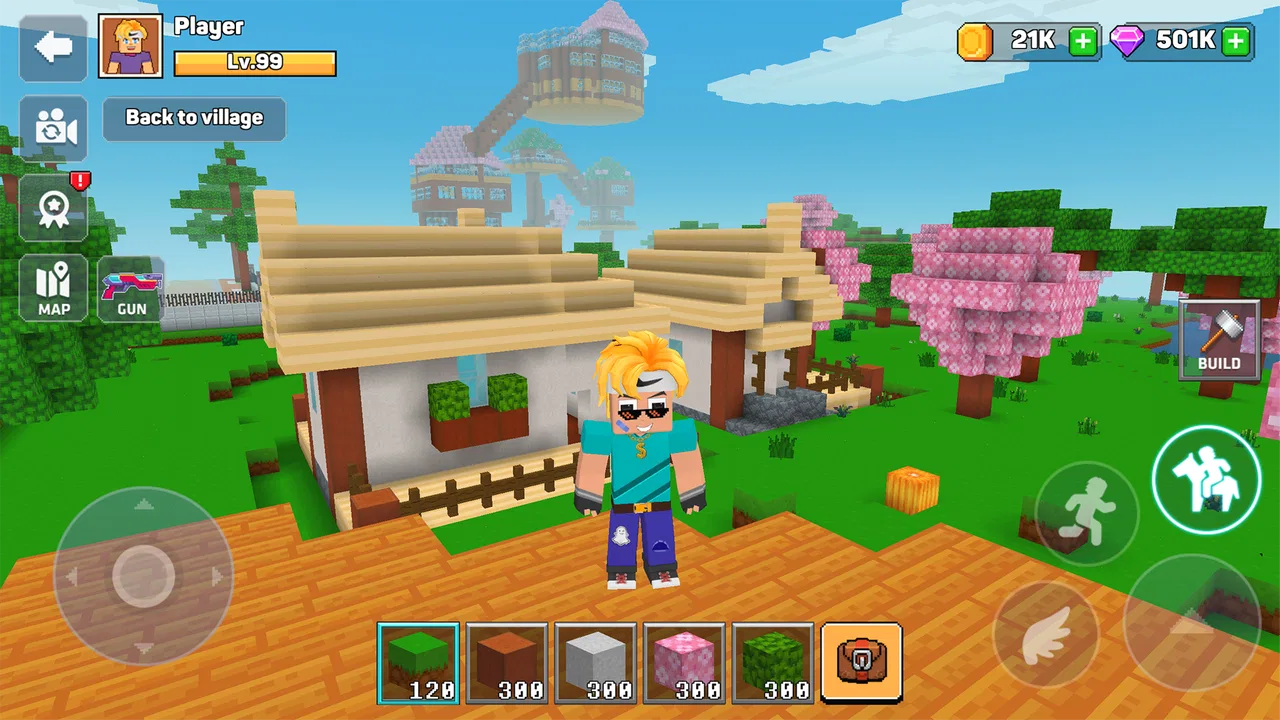
I went into Town Building Life Simulator expecting a simple cube-world construction game, but its appeal became clearer after a few sessions: the fun comes from making one small change, seeing the town look more complete, and then finding a reason to improve the next area. It is a free simulation game from XGame Global, aimed at players who enjoy building at their own pace rather than racing through a tightly scripted adventure.
The basic idea is easy to understand. You work inside a block-based world and shape a town through construction and decoration. That simplicity is useful because I never needed a long explanation before starting, yet it also means the game depends heavily on whether you enjoy setting your own goals. If you want a clearly directed campaign with constant objectives, this may feel loose. If you like turning an empty space into something personal, the open-ended format has plenty of room to keep you busy.
How the town-building loop feels in practice
When I’m deciding what to build next, I find it helps to treat each session as a small design problem rather than a push to expand everywhere. I’ll look for one spot where a route, building, or open plot feels disconnected, then make a focused change and check how it affects the surrounding area. That makes the town easier to read and sets up a useful question: when a project stalls, what should I check before blaming the game?
You May Also Like

 AccuWeather: Weather Radar
AccuWeather Review: A Quick, Clear Forecast for Everyday Decisions
For everyday plans, the best forecast is the one you can understand quickly. AccuWeather makes rain timing, radar, and local conditions easy to act on, with a few trade-offs.

 Hill Climb Racing
Why Hill Climb Racing Still Turns Crashes Into One More Run
A tiny car, a bumpy hill and one more upgrade: Hill Climb Racing keeps resurfacing because its simple chaos makes every near-miss feel personal.

 AliExpress - Shopping App
AliExpress Makes Global Shopping Feel Personal, but Shoppers Bear the Risk
AliExpress turns a global marketplace into a pocket-sized discovery engine. Its reach is useful, its shopping loop compelling, and its trade-offs easy to miss.

 Lords Mobile: Kingdom Wars
Lords Mobile Is a Kingdom-Building Routine, Not a Quick Match
A case-by-case verdict on the building, battles, device demands, and social commitments that make Lords Mobile rewarding for some players and exhausting for others.

 PDF Scanner app - TapScanner
TapScanner Makes Paperwork Easier to Capture, Check, and Share
TapScanner makes scanning with a phone feel less like a rescue operation and more like a dependable step in getting work done. Its capture tools are useful, though not flawless.

 Block Blast!
 Shows How Much a Puzzle Game Can Leave Out
A quiet grid game shows why puzzle players increasingly value instant clarity, repeatable skill and low-pressure play—and where the genre still needs to catch up.
More From Our News Desk
View All News


The first action is deliberately simple
My first useful move was not trying to create an impressive city. I began with a small, manageable section and focused on making it look intentional. In a cube-based environment, even a short wall or a basic path can change how the whole area feels. That immediate visual response is important: the game gives me a reason to keep placing, adjusting, and extending instead of leaving me staring at a blank building area.
This is where the simulation category fits well. The pleasure is not only in collecting something or reaching the next screen. It is in arranging a space and watching the result develop. I can approach the town as a practical project, a decorative experiment, or a relaxed place to spend a few minutes. The same tools support different moods, although the game is most satisfying when I arrive with at least a rough idea of what I want to build.
I recommend starting with a compact neighborhood rather than spreading construction across the entire world. A small district gives each action more visible impact. I found it easier to judge proportions, notice awkward gaps, and decide what should be added next. Once that area feels coherent, expanding outward becomes more rewarding than placing random structures everywhere.
The feedback rhythm keeps small tasks meaningful
The strongest part of the experience is the rhythm between action and feedback. I place or arrange something, look at the updated space, and immediately decide whether it improves the town. That response is visual rather than complicated, but it works. A road that connects two areas, a building that fills an empty corner, or a cluster that creates a recognizable district can make the next decision feel obvious.
That rhythm also explains why the game can be relaxing. I am not required to solve a difficult puzzle before seeing progress. The feedback arrives in small pieces, so a short session can still feel productive. At the same time, the lack of pressure may disappoint players who need frequent dramatic events. The town develops through accumulation, not through constant surprises.
One practical habit helped me avoid messy layouts: I treated empty space as part of the design instead of trying to fill every gap. In a block-based town, too many buildings placed too closely can make the result difficult to read. Leaving room around important structures gives later additions somewhere to go and makes the existing work easier to appreciate.
I also found it useful to switch between close inspection and a wider view. Up close, I notice individual blocks and decorative choices; from farther away, I can see whether the streets and buildings form a believable pattern. This two-level check is more valuable than simply adding more objects. A detail can look good by itself but still make the overall town feel unbalanced.
Rewards work best when they support a personal plan
The reward in this game is closely tied to visible improvement. Completing a small section gives me a finished-looking place to return to, while a larger project creates a longer-term reason to continue. I do not see the experience as a checklist that must be cleared as quickly as possible. The better approach is to choose a theme or purpose for each area and let the construction support it.
For example, I might decide that one part of the town should feel residential, while another should have a busier civic or commercial character. Even without turning the game into a strict management exercise, these personal rules make decisions easier. When I know what an area is supposed to become, each new building has a job instead of being another isolated object.
A useful trade-off appears here. Building quickly can make the town grow faster, but slower placement usually produces a more coherent result. I prefer making a few deliberate changes, then stepping back to inspect them. This reduces the temptation to rebuild large sections later and makes the reward feel earned through planning rather than simple repetition.
The game is free to play, with optional in-app purchases ranging from under a dollar to around a hundred dollars per item. That pricing range is worth keeping in mind before spending. I would first learn which parts of the building loop I genuinely enjoy and whether the free experience already gives me enough creative freedom. For a casual player, purchasing immediately would make little sense; the core question is whether an optional item meaningfully improves a project I already care about.
Resetting a session is part of the appeal
When I finish a session, I rarely feel that I have reached a final endpoint. Instead, I leave the town in a temporary state and return with a new idea. That reset is not necessarily a literal wipe or a formal restart; it is the mental reset that happens when I close the game and later look at the same space differently. A building that seemed finished may suggest a new road, a missing transition, or an entirely different use for the surrounding area.
This is why the game can remain approachable for short visits. I can make one modest improvement and stop, or stay longer when a larger plan starts to take shape. The session has a natural stopping point because each construction decision produces a visible before-and-after result. I do not need to complete an entire town to feel that the time was worthwhile.
A realistic everyday use case would be playing during a short break, choosing one unfinished corner, and spending the session connecting it to the rest of the settlement. I might add a route, adjust the surrounding buildings, and then stop once the area looks less isolated. That kind of focused task is more satisfying than opening the game without a plan and placing things at random.
The downside is that players who depend on a strong reset structure may find the open-ended design less motivating. There is no guarantee that every session will produce the same sense of progress. If I am tired or undecided, I can wander between ideas without accomplishing much. The solution is to set a small target before starting: finish one block, improve one street, or give one district a clear identity.
What separates it from more conventional simulation games
Compared with management-focused town simulators, this game feels more personal and hands-on. Traditional alternatives often emphasize budgets, population figures, production chains, or complex systems that react to the player’s decisions. Here, the main satisfaction comes from shaping the physical appearance of the town in a cube-based world. That makes it easier to start, but it may feel less deep to someone looking for detailed economics or demanding resource strategy.
Compared with pure sandbox building games, the town-focused framing gives my creativity a useful direction. I am not only making isolated structures; I am encouraged to think about how a settlement fits together. The limitation is that the experience depends on my willingness to invent projects. Players who prefer a large catalog of guided missions may find a more objective-driven game more rewarding.
The block style also changes how I judge quality. Realistic graphics are not the point, and a slightly uneven design can still have charm. What matters is composition: recognizable areas, readable routes, and enough contrast between districts to make the town feel planned. I would not choose this game for visual realism, but I would choose it when I want a lightweight creative space that does not demand architectural expertise.
Who should try it and who should skip it
I think it is a good fit for players who enjoy decorating, arranging, and gradually improving a world. It also suits people who prefer flexible sessions, because a project can be paused after a small change and revisited later. The Teen content rating makes it more appropriate for older children and adults than for very young players, so families should consider that rating before installing it.
I would be more cautious about recommending it to someone who wants constant action, competitive multiplayer pressure, or a tightly paced narrative. The game’s reward is visual and creative, not the rush of defeating opponents or clearing difficult stages. It is also not the best choice for players who become frustrated by self-directed goals. Without a personal building plan, the freedom can feel like a lack of direction.
Device compatibility is fairly accessible: the current version is 4.1.5 and requires Android 8.0 or later. On a compatible phone or tablet, I would still reserve some patience for learning how the controls feel, because block placement and camera movement can be less precise on a small screen than on a larger display. Anyone choosing between mobile and a more expansive building platform should consider whether touch control is comfortable for detailed layouts.
Small strategies that improve the experience
My first tip is to build in layers. I start with the broad shape of a district, then add connections, and only afterward spend time on smaller visual details. This prevents decorative work from being wasted when I later realize that a road or building needs to move. It also creates a clearer action-feedback cycle: every layer answers a different question about the town.
My second tip is to use landmarks as anchors. A town is easier to understand when one or two areas act as reference points. I can then judge whether new construction supports those anchors or competes with them. This is more effective than treating every building as equally important, especially when the world begins to grow.
My third tip is to keep unfinished areas intentional. Instead of viewing an empty plot as failure, I use it as a reserved space for a future idea. That helps prevent rushed placement and gives me a reason to return. The best long-term projects are not always the densest ones; they are the ones where each expansion has a clear relationship with what is already there.
Finally, I would avoid judging a project immediately after placing one object. I prefer to make a small group of related changes, then inspect the result from a wider perspective. This reduces overreaction to individual details and makes it easier to recognize whether the area actually improved.
My verdict on the complete loop
The loop is straightforward: take a building action, receive immediate visual feedback, enjoy the reward of a more developed town, step away when the project reaches a natural pause, and return because a new improvement has occurred to you. That cycle is not designed to overwhelm me with complexity. Its strength is the calm satisfaction of turning an idea into a visible place.
With an average rating of 4.2 from around 179 thousand ratings and more than a hundred million installs, the game has clearly reached a broad audience. Those figures do not change my personal experience, but they fit the accessible nature of the design. XGame Global has created something easy to enter, while still leaving enough creative space for players who enjoy planning their own districts.
My recommendation is simple: choose it for relaxed town creation, not for deep economic simulation or nonstop objectives. I would install it if I wanted a free mobile building game that rewards patience and personal taste. I would skip it in favor of a more structured alternative if I needed missions, competition, or detailed management systems to tell me what to do next. For the right player, though, the reason to begin another session is convincing: there is always one more corner that could become a better part of the town.
FAQs for Town Building Life Simulator
01What is the main objective of Town Building Life Simulator?
In Town Building Life Simulator, the primary objective is to create and manage your own town. Players are tasked with building infrastructure, managing resources, and ensuring the happiness of their citizens. The game combines elements of strategy and simulation, allowing you to experience the challenges of running a thriving community.
02What features does Town Building Life Simulator offer?
Town Building Life Simulator includes a variety of features such as customizable buildings, resource management, and a dynamic citizen feedback system. Players can engage in quests, unlock new technologies, and explore different architectural styles. The game also offers seasonal events and challenges to keep gameplay fresh and engaging.
03Is Town Building Life Simulator suitable for all ages?
Yes, Town Building Life Simulator is designed to be family-friendly and suitable for all ages. The game’s interface is intuitive and easy to navigate, with no inappropriate content. It offers a great way for both younger and older players to learn about city management and planning through interactive play.
04Does Town Building Life Simulator require an internet connection?
While Town Building Life Simulator can be played offline, certain features such as online leaderboards and seasonal events require an internet connection. Playing online also allows you to access updates and new content as they become available, enhancing your gaming experience.
05Are there in-app purchases in Town Building Life Simulator?
Yes, Town Building Life Simulator offers in-app purchases. These are optional and primarily consist of cosmetic items, additional resources, or premium features that enhance gameplay. Players can enjoy the full experience without making purchases, but these options are available for those looking to expedite their progress or customize their town further.
Pros
- Engaging city-building mechanics.
- Dynamic weather and day-night cycles.
- Charming
- detailed graphics.
- Intuitive
- user-friendly interface.
- Regular updates with new content.
Cons
- In-app purchases can be pricey.
- Requires constant internet connection.
- Occasional performance lags.
- Limited customization options.
- Energy system restricts playtime.

Town Building Life Simulator
Gallery